Deprecated: Methods with the same name as their class will not be constructors in a future version of PHP; plgSystemtawkto has a deprecated constructor in /home/drencre/public_html/plugins/system/tawkto/tawkto.php on line 17

Deprecated: Methods with the same name as their class will not be constructors in a future version of PHP; plgSystemSDGoogleAuthorship has a deprecated constructor in /home/drencre/public_html/plugins/system/sdgoogleauthorship/sdgoogleauthorship.php on line 14

Warning: Cannot modify header information - headers already sent by (output started at /home/drencre/public_html/plugins/system/tawkto/tawkto.php:17) in /home/drencre/public_html/libraries/src/Input/Cookie.php on line 100
Resetting Tips & Tricks https://tn450.dr-ink.ca/help/resetting-tips-tricks/60-hp-inkjet-printers.html Thu, 30 Apr 2026 14:04:39 -0400 Joomla! - Open Source Content Management en-gb support@dr-ink.ca (Dr Encre / Dr Ink) HP 932XL/933XL/950XL/951XL Non-Recognition Message https://tn450.dr-ink.ca/help/resetting-tips-tricks/60-hp-inkjet-printers/89-hp-932xl-933xl-950xl-951xl-non-recognition-message.html https://tn450.dr-ink.ca/help/resetting-tips-tricks/60-hp-inkjet-printers/89-hp-932xl-933xl-950xl-951xl-non-recognition-message.html
  • On the printer control panel, touch (right arrow), and then touch (Setup).
  • Select (Preferences), and then select (Cartridge Chip Information).
  • Touch (OK) to turn off the usage information collection.
  • ]]>
    order@dr-ink.ca (Stefan Cote) HP Inkjet Printers Wed, 28 Jun 2017 10:19:14 -0400
    HP 950/951 950XL/951XL Cartridge Protection https://tn450.dr-ink.ca/help/resetting-tips-tricks/60-hp-inkjet-printers/88-hp-950-951-950xl-951xl-cartridge-protection.html https://tn450.dr-ink.ca/help/resetting-tips-tricks/60-hp-inkjet-printers/88-hp-950-951-950xl-951xl-cartridge-protection.html On the printer:

    HP OfficeJet Pro 8600

    1. On the printer control panel, touch (right arrow), and then touch (Setup).
    2. Select (Preferences), and then select (Cartridge Chip Information).
    3. Touch (OK) to turn off usage information collection.

    HP OfficeJet Pro 8100

    1. On the printer control panel, press and hold the (Wireless) and (Resume) buttons.
    2. The ink supply icons will blink four times.
    3. Press and hold the (Wireless) and (Resume) buttons again to turn usage information collection back on.

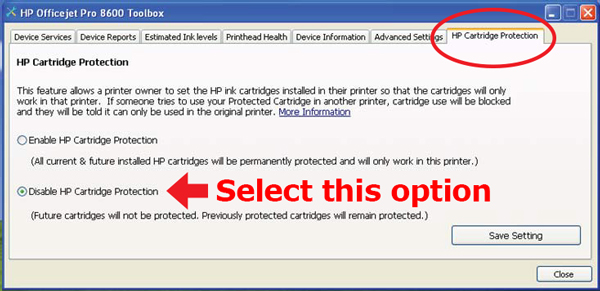
    Next on the computer: (See image below.)

    The HP Officejet 8100 and 8600 has a “cartridge protection” feature. In the toolbox there is a tab named “HP Cartridge Protection”, where you can choose if you want to enable or disable this function. The default setting here is “enable” which results in the cartridges only working in this particular printer. If you install the cartridges treated with this “protection” feature in another printer, they will not work and a message pops up.
     

    ]]>
    order@dr-ink.ca (Stefan Cote) HP Inkjet Printers Wed, 28 Jun 2017 10:18:30 -0400